Set up a project
Add and remove languages
Add a language to a source or remove one from the source's details, then publish the change to your repository as a file.
Project owners change a source's languages; translators (Editor role) can see each language's status but not change it. Adding and removing work for JSON catalog and Chrome extension messages sources, which keep one file per language. For other formats, add or delete the language file in the repository, and Malmoi picks the change up on the next update.
Open the Languages card
Open Sources, open the source's details, and find the Languages card. Each row shows a language's progress and one action. A language that isn't in the source can be added with Add language at the top of the card.
A row can show:
- Adding or Removing — a change you requested that the repository doesn't have yet.
- Inactive — the language file is gone from the repository. Its translations are kept in Malmoi.
- Unsent — the change hasn't gone into a pull request yet (a merge request on GitLab).
- A link to the pull request (a merge request on GitLab) — the change went out in Malmoi's last publish. The link points to that publish's pull request, which may no longer be open.
- Not confirmed in the pull request — the last publish couldn't finish, so Malmoi can't tell what the pull request contains. Publish again before you cancel or change this language.
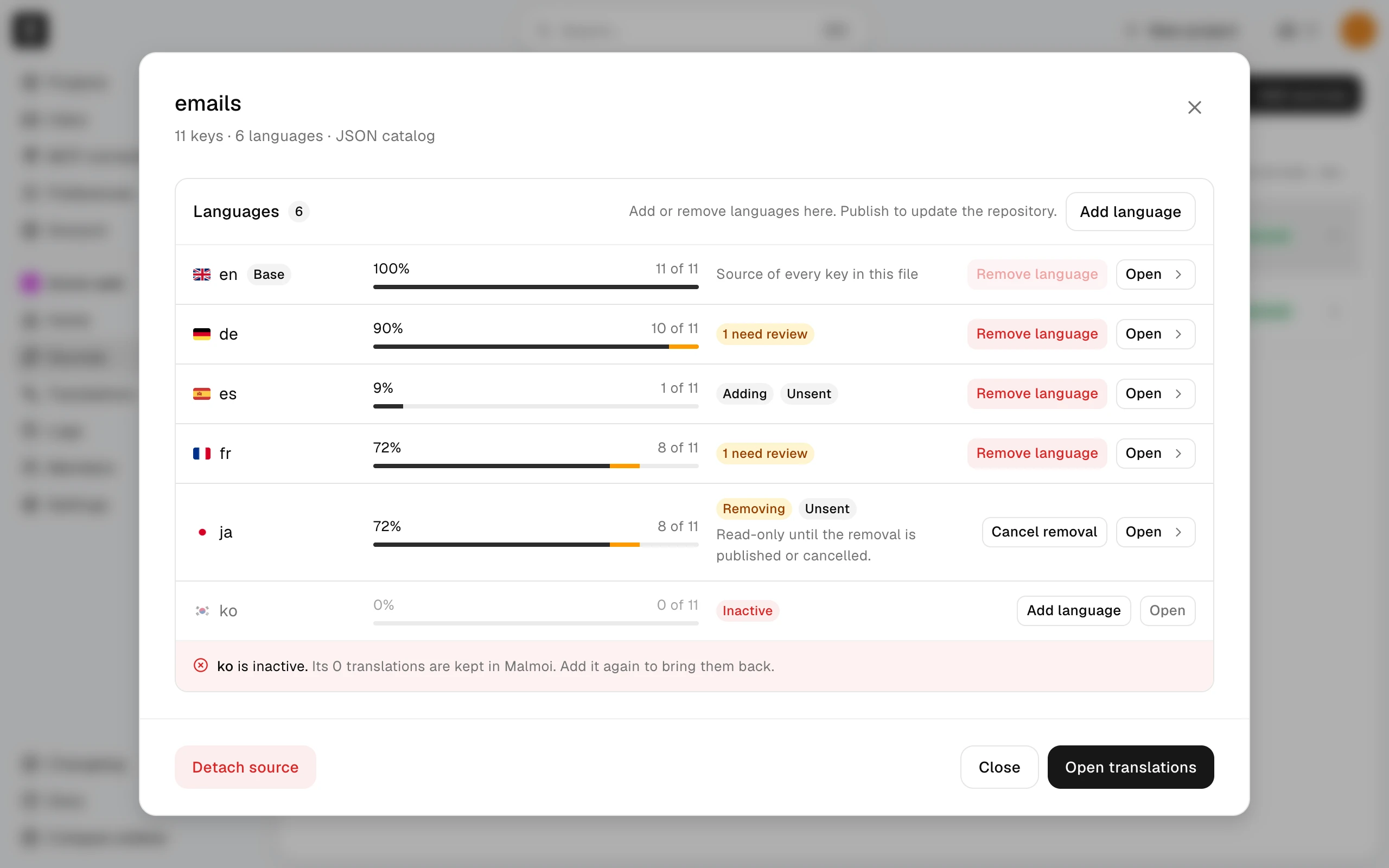
On the base language's row, Remove language is turned off; choose another base language first. For translators, and for formats that don't support adding and removing, the buttons are turned off too, and the card's description says why.
Add a language
- In the Languages card, choose Add language.
- For a JSON catalog, choose a language from Common languages or type a code in Language code: a lowercase language with an optional region, such as
fr,pt-BR, orzh_TW. Languages that were in this source before are listed first, under Previously in this source. For Chrome extension messages, choose from Language; Chrome supports a fixed list of codes. - Check File to create, the path the file will have. Choose Add language again to confirm.
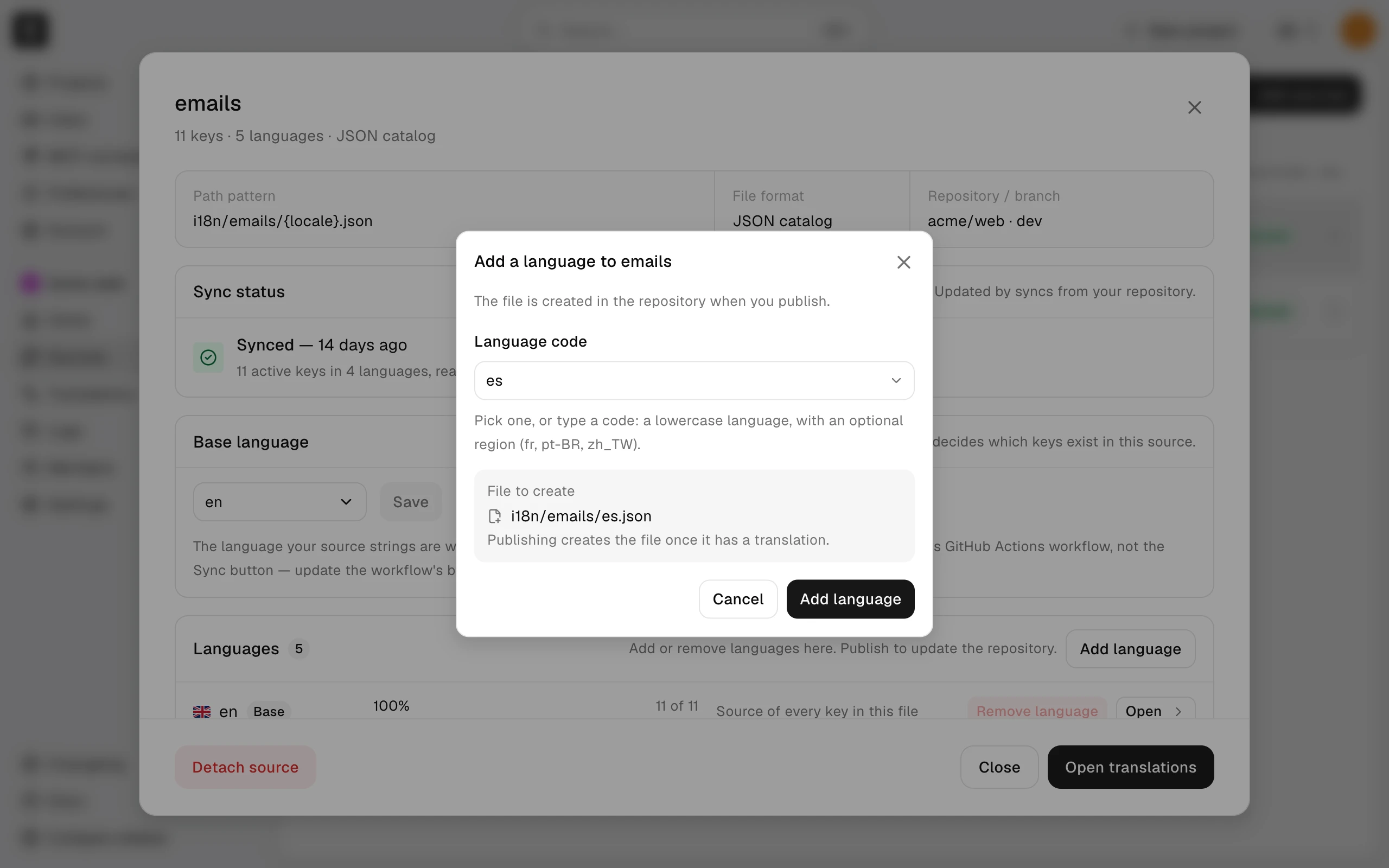
Malmoi refuses a language that is already in the source, one whose file path matches an existing language's (for example pt-BR and pt_br), one that would write to a file another source owns, and one that is being removed — cancel that removal instead.
The new language appears with Adding, and translators can open it and translate right away. The file doesn't exist in your repository yet: Publish creates it, once the language has at least one translation. Until then Publish lists the language as Not included.
If you add a language that was in this source before, Malmoi brings back its saved translations as unsent edits, so the next Publish sends them.
Remove a language
- In the Languages card, choose Remove language on the language's row.
- Read the confirmation. It shows the language, its file, how many translations Malmoi keeps, and whether a pull request already includes the change.
- If the language has unsent edits, the confirmation says how many will be discarded; each goes back to the value last sent to the repository. If some edits were never sent, there's no value to go back to, and Malmoi asks you to publish first.
- Choose Remove language again. The row stays in the list with Removing, and translators can no longer save edits in that language.
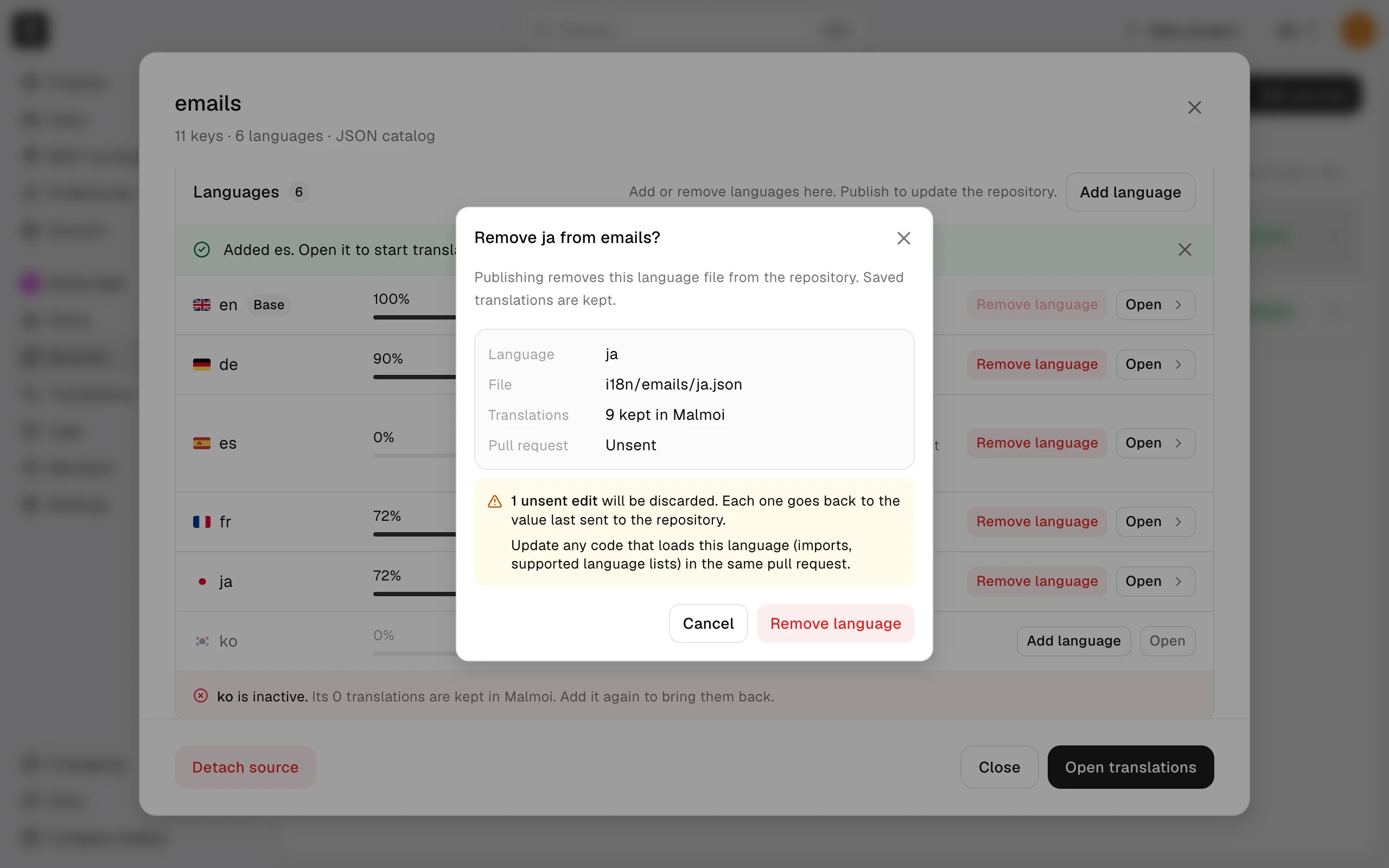
Removing a language deletes its file in the next Publish. It doesn't touch your app's code. The confirmation, and the pull request description, remind you to remove references to the language (supported-language lists, routing, and the code that loads the file) before you merge, so the app doesn't load a missing file.
The translations stay in Malmoi. After the pull request is merged, Malmoi shows the language as Inactive (see What happens after the merge), and adding the same code again brings the translations back.
Cells for a removing language
In Translations, a cell for a language that is being removed is read-only. If you type in it anyway, the cell says the edit can't be saved, with a Discard change button. Saving a key that has an edit in a removing language saves none of that key's languages. Discard that edit, or cancel the removal, then save.
Cancel a change
- To cancel a removal, choose Cancel removal on the language's row. There is no confirmation.
- To cancel an addition, choose Remove language on the language's Adding row. The language becomes Inactive and its translations are kept; unsent edits in it stop being tracked until you add the language again.
If the change hasn't gone into a pull request, canceling ends it. If a pull request already includes it, Malmoi tells you to publish to update the pull request: the next Publish takes the change back out of it. A cancel doesn't finish until you do that.
What blocks other work
While a language change is pending, Malmoi blocks a few other changes:
- Base language: you can't choose a language that is being added or removed as the base language, and you can't remove the base language.
- Base branch: in Settings, Base branch can't be changed while any source has a language change that isn't finished. Malmoi names the source; finish or cancel its language change first. A change is finished once its pull request is merged or closed, which Malmoi notices at the next Publish or nightly run.
- Updates from the repository: if a language removal hasn't been published yet, the workflow and the nightly run don't update the project: Logs shows Held, and Held because says a language removal is still unsent. The update resumes once the removal is published or cancelled. Adding a language doesn't hold updates. See Keep unsent edits.
- Sync: a project owner's Sync from the repository drops pending language changes. Its confirmation lists each one: a language that won't be added (its translations stay in Malmoi) or won't be removed (it stays in the source). If a dropped change was already in a pull request, publish again afterward so the pull request stops carrying it.
Publish the change
Choose Publish, as for any change. If only language files changed, the preview is titled Publish language changes. When a publish includes language changes, each file in the preview is headed by what happens to it:
- New file — Publish creates the file.
- Updated — a file that exists in the repository changes.
- Removed — Publish deletes the file; the translations stay in Malmoi.
- Not included — the language has no translations yet, so there's no file to create.
- Held — the file is already on the base branch. After the open pull request closes, the language becomes active at the next publish or nightly check.
- Taken back — you canceled a change after it went into a pull request, so Publish removes it from there.
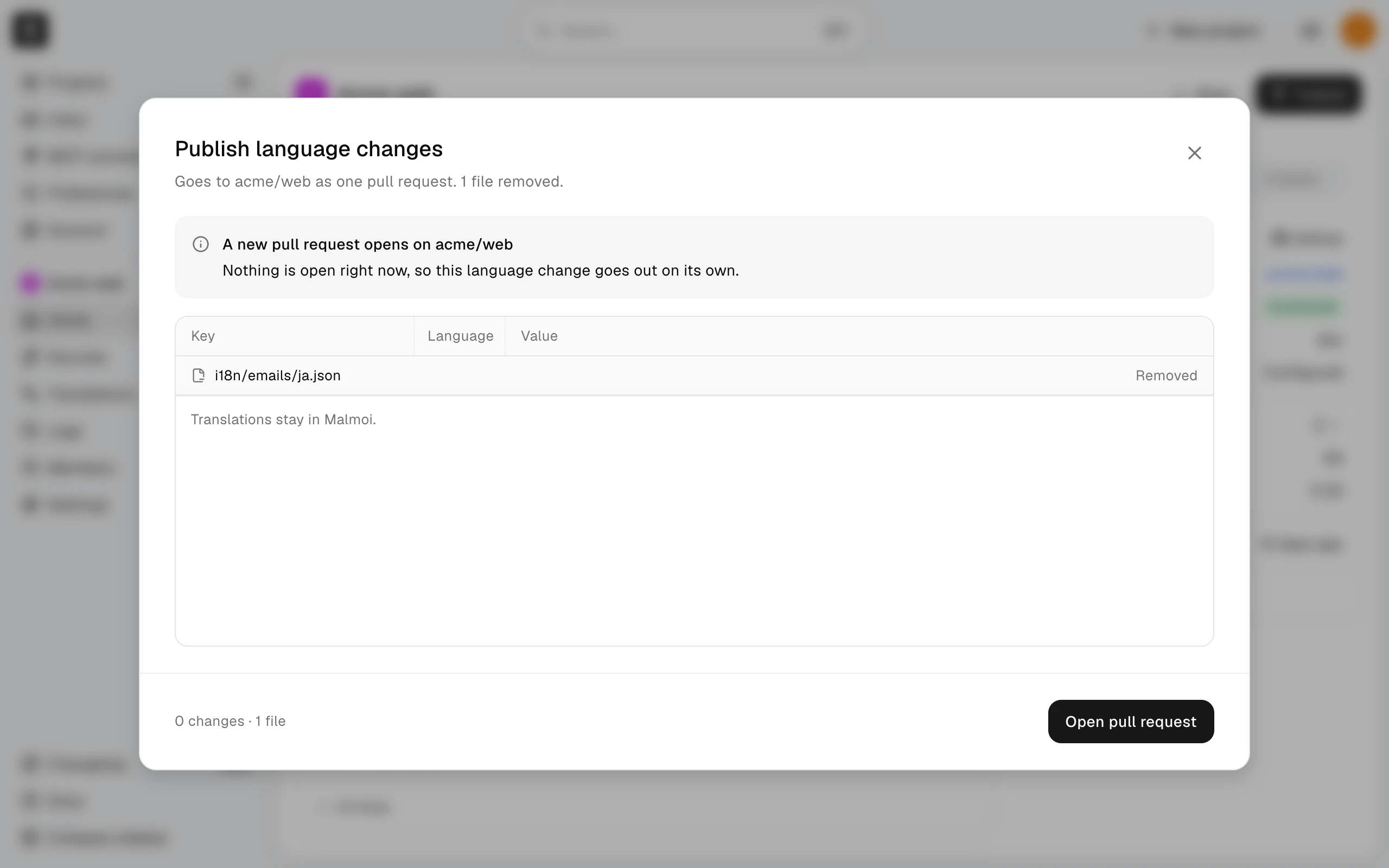
If a Malmoi pull request is open, Publish replaces what it holds with everything unsent, including the language changes, instead of opening a second one.
What happens after the merge
Malmoi learns what happened to a pull request at the next Publish or nightly run, so a merge can take up to a day to show.
- Removal merged: the language becomes Inactive. Its translations, history, and row stay.
- Removal closed without merging: the file is still in the repository, so the language stays active and the removal request is gone. Request it again if you still want it removed. Logs records the closing.
- Addition merged: the language is an ordinary language of the source.
- Addition closed without merging: the file isn't in the repository, so the language becomes Inactive and its translations are kept.
What happens next
Review the pull request, merge it, and update your app's code for the added or removed language. Logs records each request, cancellation, and closing, with who did it.